
• < Back to GCloudBackup.com
  • Contact Us
G Cloud Wiki
  • < Back to GCloudBackup.com
  • Contact Us

Manage G Cloud Backup Account Information

/Account Management /Manage G Cloud Backup Account Information
  • November 5, 2013
  • GCloud Support
  • Account Management

You can update your G Cloud Backup account information at any time to better reflect your preferences. Available settings include:

  • Your displayed name
  • Login email address
  • Login Password
Accounts created through Google or Apple ID do not have options to edit login email or password.

How to Edit G Cloud Backup Account Settings

Step 1. Access the “Account Info” Page

  1. Visit the G Cloud Backup login page, enter your login credentials, and Sign In.
  2. From the left-side panel, select Settings.
  3. From the Settings page, select Account Info.


Step 2. Change Login Email

To change your G Cloud Backup login email:

  1. Type the new email address in the New Email Address field.
  2. Click Save Changes.
Ensure the new email is accessible and active.


Step 3. Change Name

To update your displayed name:

  1. Type the new name in the New Name field.
  2. Click Save Changes.


Step 4. Change Login Password

To change your login password:

  1. Enter the old password, then the new one, confirm it, and click Save Changes.
If you have forgotten your G Cloud Backup login password, follow the password reset steps here


Step 5: Finalize Changes

After making any updates, close and reopen the G Cloud Backup app on your device(s) to apply the changes immediately.
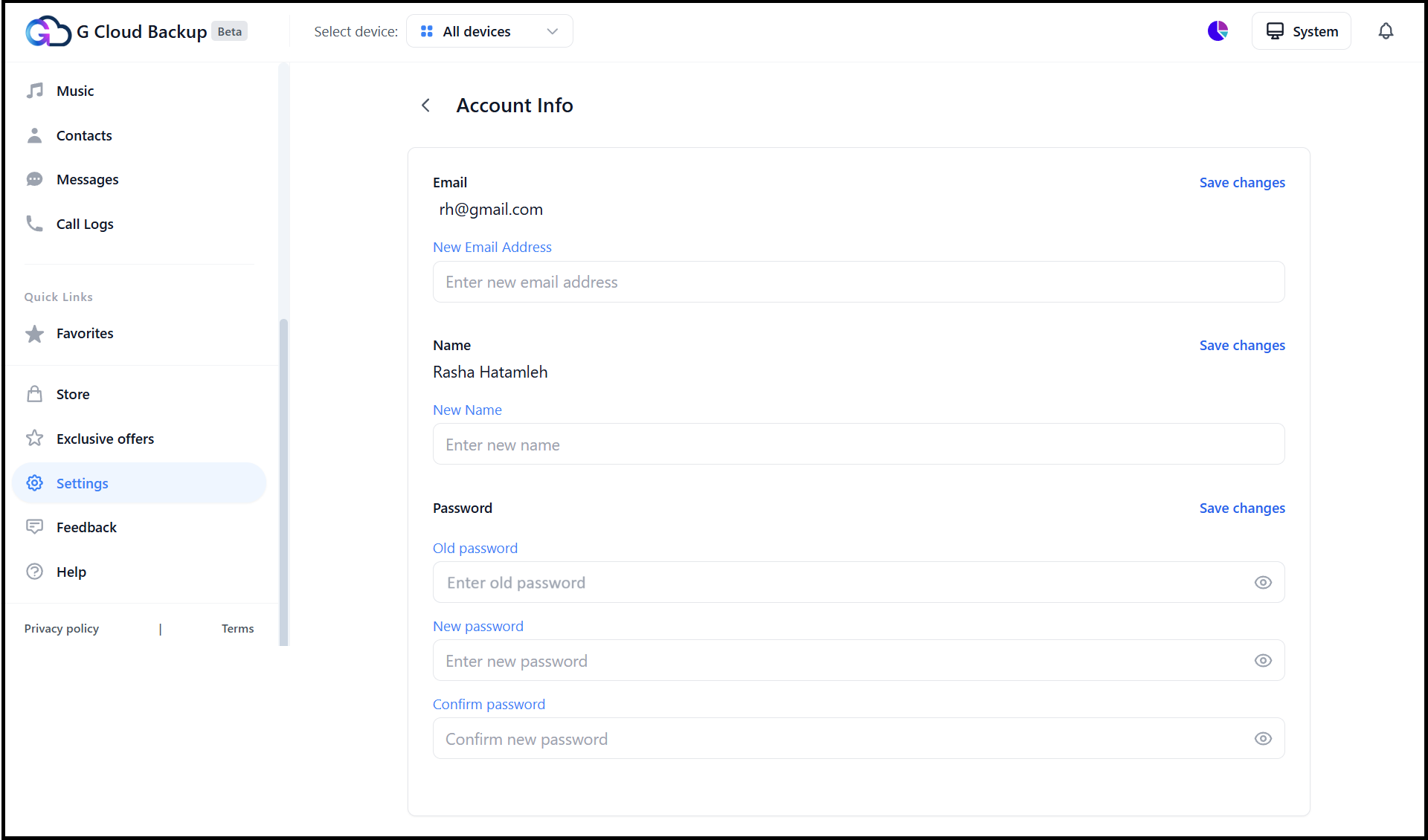
Account Info page


Tagged: change emailchange passwordemailnamepasswordsettings

Related Articles

  • G Cloud Family Plans – Share Storage, Keep Every Account Private

  • Invitation Program of G Cloud Backup

  • Access and Log in to Your G Cloud Backup Account

  • Managing Devices on Your G Cloud Backup Account

  • Rename Device under G Cloud Backup Account

  • Delete Device from G Cloud Backup Account

Category Menu

  • Getting Started
  • Account Management
  • Data Backup and Management
  • Data Recovery
  • Permissions, Privacy and Security
  • Troubleshooting and Error Handling
  • Contact Us
  • Other
  • Release Notes (What’s New!)
Contact Us
 
© Copyright, GCloud Backup
Manage Consent
To provide the best experiences, we use technologies like cookies to store and/or access device information. Consenting to these technologies will allow us to process data such as browsing behavior or unique IDs on this site. Not consenting or withdrawing consent, may adversely affect certain features and functions.
Functional Always active
The technical storage or access is strictly necessary for the legitimate purpose of enabling the use of a specific service explicitly requested by the subscriber or user, or for the sole purpose of carrying out the transmission of a communication over an electronic communications network.
Preferences
The technical storage or access is necessary for the legitimate purpose of storing preferences that are not requested by the subscriber or user.
Statistics
The technical storage or access that is used exclusively for statistical purposes. The technical storage or access that is used exclusively for anonymous statistical purposes. Without a subpoena, voluntary compliance on the part of your Internet Service Provider, or additional records from a third party, information stored or retrieved for this purpose alone cannot usually be used to identify you.
Marketing
The technical storage or access is required to create user profiles to send advertising, or to track the user on a website or across several websites for similar marketing purposes.
Manage options Manage services Manage {vendor_count} vendors Read more about these purposes
View preferences
{title} {title} {title}